

When covering very wide areas — such as driveways and gardens — the options are a rotating camera that sweeps across smaller sections at a time, or going straight for a wide-angle solution.
For the latter, Reolink has the Argus 4 Pro — a camera with a 180-degree field of view that keeps the entire area under continuous watch.
 Fonte preferida
Here is our review and verdict on this battery-powered security camera.

Reolink Argus 4 Pro review — Especially useful for open-plan areas
Wireless home surveillance has a well-known limitation. The restricted field of view of a conventional camera means installing multiple units to cover an area without blind spots — something the Reolink Argus 4 Pro proposes to solve with a single dual-lens camera and a 180-degree field of view.
The Reolink Argus 4 Pro is a wireless outdoor security camera with dual lenses that creates a continuous 180-degree panoramic image in 4K resolution, ColorX technology for full-colour night vision with an f/1.0 aperture, and a 1/1.8-inch CMOS sensor.
Aproveite a campanha:


It supports dual-band Wi-Fi 6, AI-powered smart detection of people, vehicles, and animals, a 180-degree PIR sensor, two-way audio, IP66 certification, and microSD storage up to 512GB or integration with the Reolink Home Hub.
The battery charges to 24 hours of autonomy in 10 minutes and is compatible with the Reolink solar panel for continuous charging.
It is available with solar panel included for €159.99.
Design and build quality
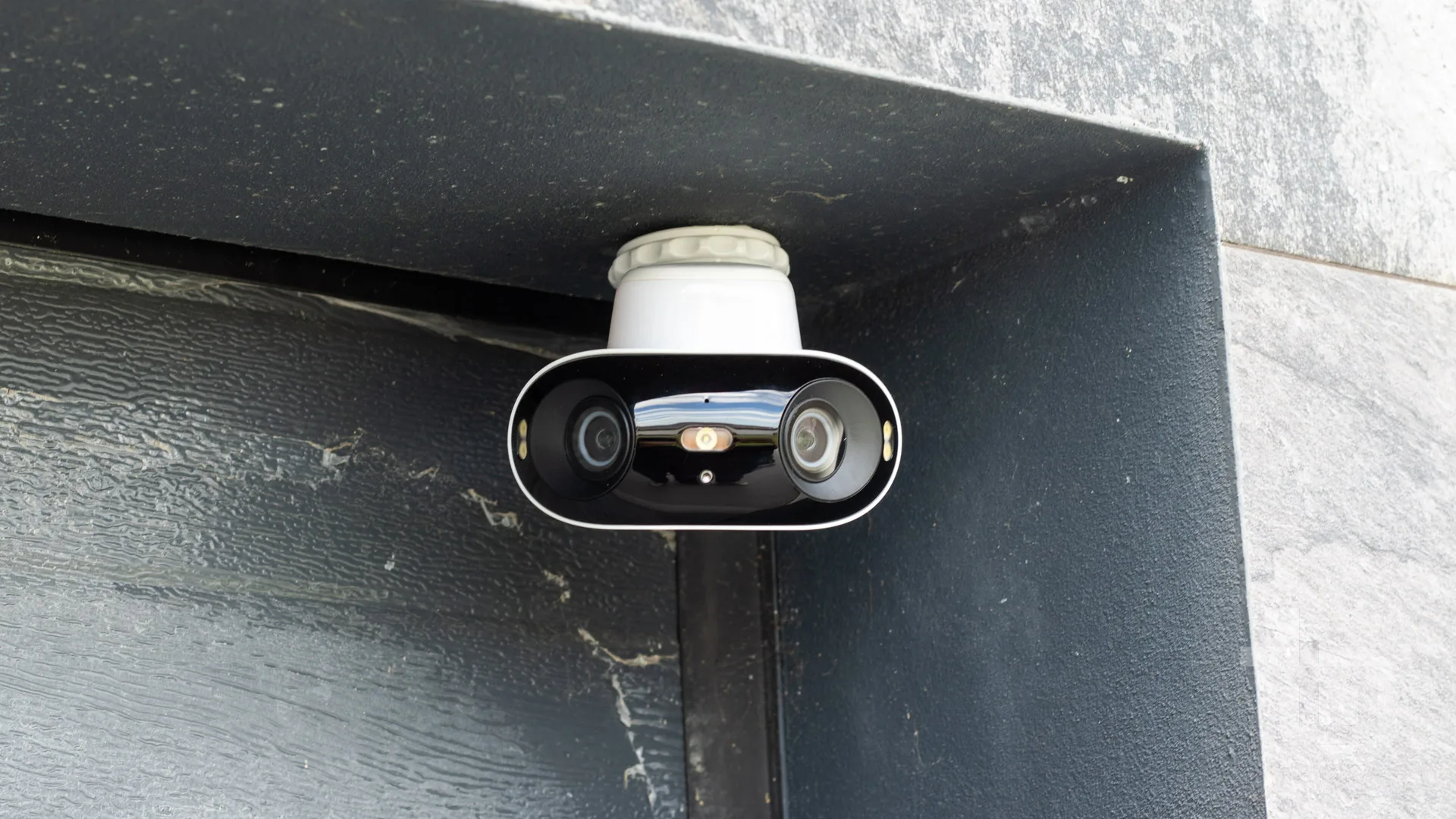
The Reolink Argus 4 Pro is a generously sized camera — a consequence of the dual-lens system, which also contributes to its weight. It measures 128×87×80mm and weighs 400 grams.

Visually, the device is reminiscent of a small robot head — with one lens on each side, giving the impression of two eyes.
On the front are the two sensors, with LED lights on the sides and centre. Also here are the status LED, the microphone, and the PIR detection system behind the outer black plastic panel.

On the back are the speaker and the USB-C connector for charging and connecting the solar panel.


Just below that is a threaded mount for wall fixing.

On the bottom are the power button, reset button, and microSD card slot.

On the front base there is a white platform.

Build quality is solid with robust plastics and IP66 certification for outdoor use, though it can equally be used indoors to monitor garages, courtyards, or similarly wide areas.
Installation and setup
Installing the Reolink Argus 4 Pro is straightforward and does not require advanced DIY skills.
The box includes a wall-mounting bracket with screws and wall plugs. Attach the bracket to the wall and then secure the camera using the threaded mount.

Alternatively, the box includes a strap and adapter for mounting without drilling. This option requires more thought, as the camera’s weight means a secure fastening is essential to prevent slipping or falling over time.
Since the base is flat, the camera can also simply be placed on a flat surface in indoor environments.

Once the camera is in position, it is time to set it up. Install the Reolink app on your smartphone, tap the + button, and follow the steps to pair the camera. This can be done directly on the home Wi-Fi network or via a Reolink hub such as the HomeHub or Home Hub Pro for centralised local storage.
Once the process is complete, live view and settings are accessible from anywhere in the world.
Is the 180-degree field of view real?
The Reolink Argus 4 Pro covers a large area, with Reolink claiming 180-degree capture.
This is indeed the effective image capture area, though the PIR motion sensor covers 170 degrees — still an impressively wide range.

The view is split between two cameras and can be switched between them to see the full field of each individual lens.

There is also a combined panoramic view of both cameras, allowing you to tap the specific area you want to see — whether the full view of one lens or the stitched image of both.

Where the two images are stitched together, a slight discrepancy is noticeable — objects can appear slightly misaligned or duplicated at the seam.

This varies depending on the complexity of the scene and will not always be visible. In any case, the settings allow adjustment of the stitch point to find the best possible result.

One limitation we were less happy with is the inability to flip the image horizontally or vertically — something other cameras support.

Given the size and weight, mounting the camera upside down can sometimes make installation easier — but doing so always results in an inverted image with no way to correct it in the app.

Daytime image quality
Image quality during the day is strong.
The surrounding area is clearly readable and faces remain well focused and easy to identify.
Digital zoom is available, though as expected, quality degrades as magnification increases.
This solid quality carries through to both photos and video.
Colours could be a touch more vivid and bright, but this can be adjusted in the settings.


Night vision with ColorX
At night there is an expected reduction in quality, but results are still very positive.
Even with minimal ambient light in the distance, ColorX technology produces a slightly softened but full-colour image with reasonable sharpness for night footage.


With the floodlight active, quality improves considerably — providing illumination that reaches roughly 7 to 10 metres.

Whether the floodlight is on or off, detail is clearly identifiable — providing more than enough quality to recognise an intruder’s features.
Smart detection and alerts
The Reolink Argus 4 Pro has an intelligent detection system that identifies what type of motion is occurring.
Events are categorised into four types: person, vehicle, animal, and other. Detection is automatic and AI-powered, with each category individually toggled on or off, and sensitivity, object size, and detection zones all customisable.

General alerts can also be scheduled for specific time windows.
Alerts can be delivered via push notification, FTP, or email, and can also trigger a siren directly on the camera. If a HomeHub is connected, the siren can be triggered on that device instead.

Reolink app
The Reolink app is straightforward to use. Once the camera is configured, live view, recording playback, and settings are all accessible.
In live view, the bottom of the screen shows the full capture area — tap any section to bring it up larger at the top, whether a full single-lens view or a stitched zone from both.

Below the live view are quick controls for the microphone, photo and video capture, recording playback, and floodlight activation. At the top are settings and the option to trigger the siren.
In playback, a timeline view shows periods where recordings are available.
In settings, the display mode can be customised — including the stitch point adjustment and brightness and contrast settings. Image flip is not available, which prevents using the camera upside down to simplify installation in tighter spots.

A privacy mask can be set to exclude neighbouring properties from capture — important for compliance with legal requirements.

Smart detection settings, recording schedules and durations, and motion sensor sensitivity can all be customised.

Floodlight activation triggers, alert delivery method (email or push notification), and whether motion detection triggers the camera siren or the HomeHub siren can all be configured.

There is also a timelapse video option.

Storage
Recordings from the Reolink Argus 4 Pro can be stored in three ways.
A microSD card inserted directly into the camera stores footage locally. If a HomeHub is used, the setup is the same but recordings are saved directly to the hub’s storage.

Cloud storage is also available, requiring a monthly or annual subscription.
In our setup we used the Home Hub Pro integration to keep all footage stored locally and centralised alongside recordings from other cameras.

Battery life and charging
Battery life is around 2 to 3 weeks without charging.
This can be extended indefinitely with the solar panel included in the pack, keeping the camera running continuously without the need to remove and recharge it.

The included panel is the Reolink Solar Panel 2 with 6W of charging output — sufficient to top up the battery a little each day and maintain continuous operation.

This new generation solar panel is considerably larger than its predecessor.

Legal requirements for recordings in Portugal
Before installing a security camera at home, there are important rules to follow in Portugal. The use of video surveillance systems by private individuals is subject to GDPR and national legislation, and non-compliance can result in significant fines.
The most important rule is that cameras may not capture images of the public road, neighbouring properties, or shared building areas without authorisation. The Argus 4 Pro’s 180-degree field of view can easily capture areas beyond the private property boundary, so correct positioning and use of the privacy mask available in the app are essential to ensure only the intended area is captured.

It is also mandatory to display a visible notice at the property entrance indicating the presence of security cameras. If people other than the owner may be captured — such as domestic employees or service providers — they must be informed of the system.
For installations in shared areas of a residential building, prior authorisation from a residents’ meeting and registration with the CNPD — the National Data Protection Commission — are required. For strictly private use within the individual property, obligations are lighter, but signage is still recommended.
For specific cases or questions about the legality of an installation, we recommend consulting the CNPD website at cnpd.pt or seeking advice from a data protection solicitor.
Who is the Reolink Argus 4 Pro for?
The Reolink Argus 4 Pro is for anyone who wants to monitor wide, open areas — driveways, gardens, garages, or courtyards — with a single camera and no blind spots. The 180-degree field of view makes it especially suited to replacing two or more conventional cameras in the same area, simplifying installation and reducing the total system cost.
It is also a strong option for those who do not want to rely on power cables, as the battery-plus-solar-panel combination provides a fully wireless installation anywhere with sufficient sunlight. IP66 certification ensures resistance to the elements for permanent outdoor use.

For those who already have or plan to get the Reolink Home Hub Pro, native integration allows recordings from multiple cameras to be centralised at no additional subscription cost — making the combination a complete and cost-effective long-term home surveillance solution.
It is not the most suitable choice for small or compact indoor spaces where a wide field of view offers no real advantage, nor for those who need to rotate the image for inverted installation, as the app does not support this.

Verdict on the Reolink Argus 4 Pro
The Reolink Argus 4 Pro is a camera that impresses with its genuine 180-degree field of view, which truly delivers on the promise for wide-area surveillance.
ColorX technology is another strong point — producing full-colour images in low-light conditions that conventional infrared cameras simply cannot match, with the floodlight further improving night quality for detail identification at 7 to 10 metres.
The combination of 2-to-3-week battery life and an included solar panel is a very practical proposition that eliminates power cables and frequent recharging. Integration with the Home Hub Pro for centralised local storage at no ongoing cost is a compelling argument for those wanting a complete surveillance solution without recurring fees.

The most frustrating limitation is the inability to flip the image in the app, which restricts installation options in more creative positions. The slight stitch discrepancy between the two lenses is visible in some scenarios but can be minimised through the adjustment available in settings. The absence of image rotation is the limitation felt most in day-to-day use.
At €159.99 with solar panel included, the Reolink Argus 4 Pro is a very competitive proposition for anyone wanting to cover a wide area with a single wireless camera and no monthly fees.
- Captação a 180º
- Tecnologia ColorX
- Painel solar incluído no pack
- Imagem não pode ser invertida
- Costura das imagens necessita de afinação manual para casar
What is the Reolink Argus 4 Pro?
It is a wireless outdoor security camera with dual lenses and a 180-degree field of view in 4K resolution, ColorX technology for full-colour night vision, Wi-Fi 6, AI-powered smart detection of people, vehicles, and animals, a battery with 2-to-3-week autonomy, and compatibility with a solar panel for continuous charging.
Is the 180-degree field of view real?
Yes. The camera effectively captures 180 degrees with the two lenses combined, though the PIR motion sensor covers 170 degrees. The image can be viewed as a combined panoramic or split by lens.
Is ColorX night vision better than infrared?
Yes. ColorX technology produces colour images even in low-light conditions, unlike infrared night vision which only shows black-and-white footage. With the floodlight active, quality improves further, providing good illumination up to around 10 metres.
How long does the battery last?
The battery lasts around 2 to 3 weeks with normal use. With the solar panel included in the pack, the camera maintains continuous operation without manual recharging, provided there is sufficient sunlight.
Can I use the camera without a microSD card?
Yes, but storage will be limited to cloud subscription or integration with a Reolink Home Hub or Home Hub Pro for centralised local recording at no ongoing cost.
Can I point the camera at the street or my neighbour’s property?
No. Portuguese law prohibits capturing images of public roads or third-party properties. The Reolink app allows privacy masks to be configured to exclude those areas from capture. Visit cnpd.pt for more information on applicable rules.
What is the price of the Reolink Argus 4 Pro?
The pack with solar panel included is available for €159.99 in white or black.
Sobre o autor

Aproveite a campanha:


