ASUS has today launched a new compact laptop, the ASUS Zenbook 14, which aims to stand out for its elegance and durability as much as for its excellent price-to-performance ratio — without forgetting AI.
Following the success of the MacBook Neo, ASUS responds with a solution that covers a wide range of users, from those with more basic document and multimedia needs in the Snapdragon X version, to more demanding workloads in the Intel Core Ultra 7 variant.
 Fonte preferida
Read our review and opinion of this new laptop.

ASUS Zenbook 14 review – A compact laptop for students and mobile workers
For years, Windows laptops with ARM processors were viewed with scepticism, mainly because of application compatibility concerns.
Today, with the widespread adoption of Apple’s M-series chips, the conversation has shifted — the question is now whether it is worth trading the comfort of x86 for better battery life and less heat.
Aproveite a campanha:

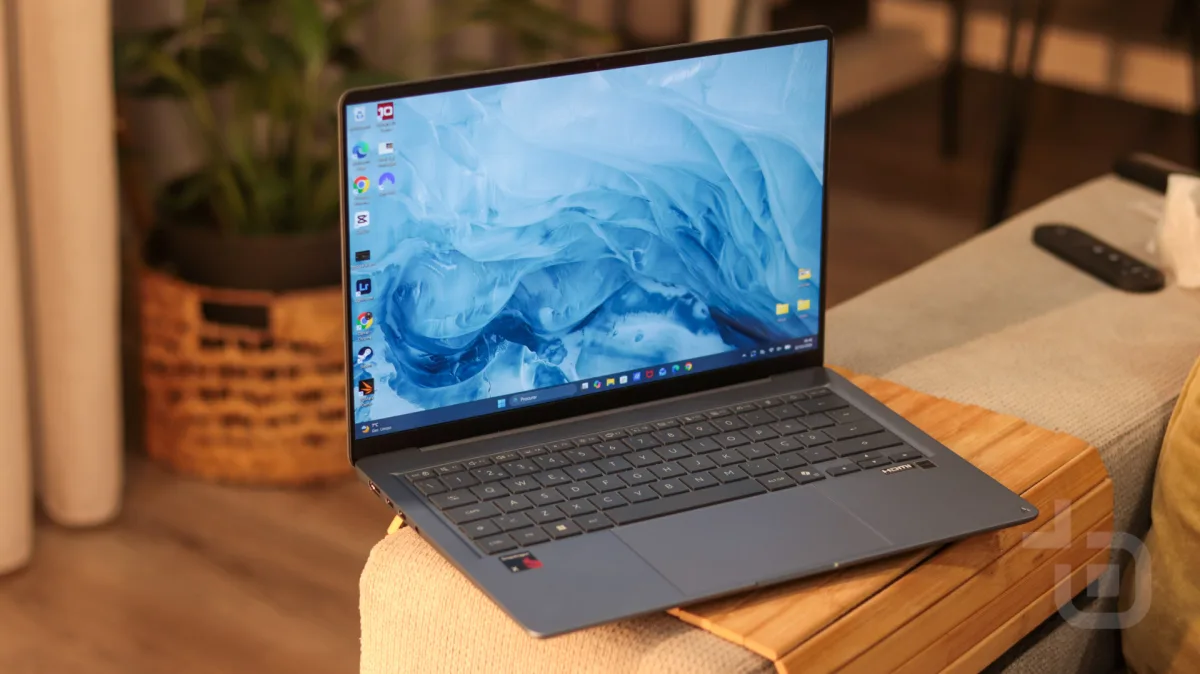
The ASUS Zenbook 14 (UX3480) with Snapdragon X is one of the most accessible answers to that question. It weighs just 1.1 kg and takes a refined approach to design, with a Ceraluminum lid — a ceramic material ASUS promises is resistant to scratches and fingerprints — here in Arctic Blue.

The configuration we tested — with 8 GB of RAM and 256 GB of storage — is the entry-level model, which immediately raises the question of how far it can go in day-to-day use.
Inside, the Snapdragon X X1-26-100 processor is paired with a 14-inch OLED display and a promised battery life of over 30 hours. It is also a Copilot+ PC, with access to the AI features in Windows 11.
Read on for our experience with the Zenbook 14, available in Portugal for €799.

Design and build quality
The ASUS Zenbook 14 is a laptop designed to be used on the go.
At just 1.1 kg it is light and practical to take anywhere, and is also very compact at 31.11 × 21.58 cm. It measures 1.39 cm at its thinnest point and 1.69 cm at its thickest.

The chassis is built from aluminium for greater durability, with the lid surface made from ASUS’s proprietary Ceraluminum material, which combines the premium feel of aluminium with the hardness and resistance of ceramics.

The use of Ceraluminum reinforces this laptop’s mobility credentials, as it is a material tested to offer greater resistance to drops and scratches from other objects that might share your bag.

As well as being light, compact, and built to last, the ASUS Zenbook 14 also focuses on design. It is available in three elegant colours — Zabriskie Beige, Komodo Coral, and Arctic Blue — which bring character to the device without being so bold as to become tiresome or overly attention-grabbing.

We reviewed the Arctic Blue variant — a blue with a slight grey undertone that offers a sober, elegant look that fits any context, while adding a little personality by breaking away from the usual black or grey shells.
The entire structure is very minimalist, with the lid featuring a subtle texture characteristic of Ceraluminum and the “ASUS Zenbook” text in a recessed negative relief with a glossy finish.

On the underside we find the speakers, an air vent, and two rubber feet to support the laptop, along with the screws that give access to the interior — where only the M.2 NVMe™ PCIe SSD can be replaced.

The rear edge is almost entirely taken up by the hinge and an air vent to help with cooling.

On the left side we find two USB-C ports, an HDMI port, a 3.5 mm jack connector, and an LED to indicate charging status.

On the right side there is just a single USB-A port and an LED that indicates whether the laptop is on — with a steady light — or in standby, with a blinking LED.

Opening the laptop reveals a 14″ display with an 89% screen-to-body ratio, with slim bezels on the sides and a somewhat thicker border at the top and bottom. It is above the display that we find the IR front camera used for Windows Hello face unlock, along with two microphones.

Below sits a keyboard that matches the colour of the rest of the chassis, with a smooth surface and just the right amount of resistance when pressing the keys, alongside a generously sized touchpad.

The entire surface is very smooth with a soft-touch finish that gives it a premium feel.
The fingerprint-resistance promise falls slightly short, however. While there is a clear reduction in fingerprint marks, small smudges are still visible on the lid, touchpad, and surrounding areas when viewed in raking light. That said, it is well mitigated by both the material and the colour of the device.

Display
The ASUS Zenbook 14 features a 14″ OLED display with a 16:10 aspect ratio and LED backlighting.
The refresh rate is 60 Hz (which could be higher), with a 0.2 ms response time, 70% blue light reduction for eye protection, 100% DCI-P3 colour coverage, 1,000,000:1 contrast ratio, and 300 nits of brightness. Unfortunately, the display is not touch-sensitive.

The display offers a good level of detail and excellent colour reproduction with strong contrast, characteristic of OLED panels. Viewing angles are very good, with little visual degradation when viewed from the side.

The 14-inch size is ideal for working on the go — large enough to be productive, while keeping the laptop sufficiently compact.
The system includes several preset image modes to suit different preferences, with options such as normal, vivid, eye care, e-reading (black and white), and manual adjustment.

Keyboard and touchpad
Moving on to the keyboard, this is one of the ASUS Zenbook 14’s standout features. The keys have 1.7 mm of travel, a smooth surface finish, and just the right amount of resistance when pressed.

As we had already observed on the ASUS Zenbook Duo, which features a similar solution, this is an excellent keyboard — very comfortable and practical for hours of work.
The key spacing is just right and allows for fast, accurate typing with few mistakes.

It is backlit at 3 levels and includes sleep modes to save energy when running on battery.

To keep the laptop compact, there is no dedicated numeric keypad.
Turning to the touchpad, this is also a practical tool, large enough to scroll the full screen without lifting your finger.

It is very responsive and supports multi-touch for smart gestures. A vertical swipe on the left edge adjusts the volume and on the right edge adjusts brightness. A horizontal swipe along the top edge moves forwards or backwards through pages, and a swipe from the top-right corner towards the centre launches ASUS ScreenXpert.

While practical, fingers occasionally brush the edges when moving from the touchpad to the keyboard, accidentally triggering volume or brightness changes — something that takes some getting used to.
Unfortunately, there is no option to customise gestures on the ASUS Zenbook 14. Just as the gesture to launch the ASUS tool can be assigned to a corner, it would be useful to be able to customise movements in other corners as well.
Camera, microphones, and speakers
In terms of camera, there are two separate solutions to consider: the front-facing camera for video calls, and the IR technology for facial unlock.
Starting with security, the IR is very fast at recognising faces and Windows Hello unlock is almost instantaneous, even in low-light conditions. Windows Hello can also be used to protect specific features, such as automatically filling Chrome passwords.

As for the front camera, the quality is not outstanding and it will not be used for any serious photography. However, it is perfectly adequate for video calls.

The speakers are another highlight of the ASUS Zenbook 14. The sound is well balanced and composed, with a degree of bass that is impressive for an integrated speaker system.

It is enhanced by Dolby Atmos for spatial audio and includes several audio modes in the settings.

Of course, it cannot replace a dedicated audio system, but it is more than sufficient if the laptop’s speakers are your only option for listening to music or watching films.
Connectivity
In terms of connectivity, given how thin the ASUS Zenbook 14 is, it comes as no surprise that not every port type is available.
On the left side there is an HDMI port alongside two USB-C 3.2 Gen 2 ports — either of which can be used for charging — and a 3.5 mm audio jack.

On the right side there is just a single USB-A USB 3.2 Gen 1 port.

The ASUS Zenbook 14 is not the most port-rich laptop, though what it offers is sufficient for the vast majority of today’s needs, where an increasing amount is done wirelessly. Those with more media-focused workflows will almost certainly miss a card reader.
There is also no physical switch to disable the camera, nor did we find any software privacy mode. This is a genuine concern, because anyone who wants to cover the camera will also end up blocking the IR sensor used for facial unlock.

Windows 11, ASUS apps, and AI focus
As expected, the ASUS Zenbook 14 runs Windows 11 with a strong focus on AI, and is classified as a Copilot+ PC.
Despite being ARM-based, it offers everything you would expect from any Windows laptop, including newer features such as Recall, all Copilot capabilities (Vision, chat, voice, and integration with Office, Paint, etc.), and the camera effects studio.

ASUS also bundles its own applications to complement the experience.
MyASUS lets you manage the entire device, monitor some performance metrics (temperature, CPU and memory load), and run system diagnostics.

There is also ASUS ScreenXpert, which provides quick access to display settings, microphone mute, battery modes, and fan settings. It also includes a section to monitor the battery level of Bluetooth-connected devices, and a task group feature for automating which applications launch depending on the scenario.

There is also GlideX, a tool that lets you interact with smartphones or tablets in two ways.
You can mirror your smartphone’s screen to the laptop, allowing you to follow and interact with apps installed on your phone — handy for avoiding constantly picking it up.
Alternatively, you can do the reverse and use a smartphone or tablet as a wireless second screen for the ASUS Zenbook 14.
This laptop also comes with a 3-month Google AI Pro subscription, a 3-month Xbox Game Pass Ultimate subscription, and a 1-month McAfee antivirus subscription.

ARM vs x86: what changes in day-to-day use
The ASUS Zenbook 14 does not use an Intel or AMD processor, as most Windows laptops do.
It uses a Snapdragon X, based on ARM architecture — the same processor family found in smartphones. This difference is not immediately obvious, but it has practical implications worth knowing before you buy.
This is also the strategy Apple has adopted across its entire laptop range with the M-series chips, though macOS was designed specifically for them, whereas Windows 11 has to support all architectures.

What is processor architecture?
Architecture defines the set of instructions a processor understands — the “language” in which software tells it what to do. For decades, Windows laptops used x86, the architecture of Intel and AMD processors. ARM is a different approach, designed from the outset with energy efficiency in mind.
The most visible difference is efficiency. ARM processors consume less power for the same workload, which translates into longer battery life and less heat. Because they run cooler, the fan needs to spin up less often, and the laptop tends to be quieter.
The trade-off is compatibility. Software written for x86 does not run directly on an ARM processor, and this is where the differences that matter to users begin.
On Windows on ARM, applications fall into two groups. Native apps, also known as Arm64, were built specifically for this architecture and run at maximum efficiency. Microsoft states that around 95% of the time people spend in applications is already in native versions, including browsers, Office, Teams, Zoom, and Spotify.

Apps without an ARM version — known as x64 or x86 — are not left out. Windows translates the instructions in real time through an emulation layer called Prism. This works well in most cases, but there may be some performance loss, higher battery consumption, and — very occasionally — stability issues.
The biggest obstacles tend to lie outside the most common applications. Peripherals such as printers, scanners, and capture cards — especially older or niche ones — may not have ARM drivers and may simply not work.
In gaming, titles running in compatibility mode with anti-cheat systems may also have issues, and graphical performance falls short of laptops with a dedicated GPU. Some professional software — such as engineering tools, CAD applications, or hardware-tied licences — may also fail or have bugs, and x86 system virtualisation is more limited. Finally, heavily emulated applications may run noticeably slower, something felt more acutely in a configuration with just 8 GB of RAM.
How to tell whether an app runs natively or emulated
The quickest way is to use Task Manager. Open it with Ctrl+Shift+Esc and go to the “Details” tab. In the Architecture column next to each process, Arm64 means the app is native and x64/x86 means it is being emulated.
Bear in mind that a single app may have several processes with different architectures — for example, the main application running natively and an auxiliary component being emulated — so it is worth checking all of them.

Performance with the Snapdragon X and app compatibility
In everyday use, I barely noticed any issues from the ASUS Zenbook 14 being ARM-based. I installed the applications I use regularly — Chrome, the Adobe suite, NordVPN, and others — and all of them already have native ARM versions and ran without compatibility issues.
The only problems I encountered were when running PCMark 10 and 3DMark, installed via Steam, where some tests caused the system to freeze and, in a few cases, the test did not complete.
This was the only exception, however, as everything else ran without significant issues — and it is offset by excellent thermal management, as the ASUS Zenbook 14 barely gets warm, and outstanding battery life, which we will cover next.
As well as staying consistently cool, it is very quiet, as the fan rarely needs to spin at all.

The configuration we reviewed — Snapdragon X, 8 GB of RAM, and 256 GB of storage — is the entry-level model and is more than sufficient for users with basic needs: browsing the web, watching films and series, and working on documents. It is ideal for students and professionals who work on the move and need a laptop for lighter tasks.
For more demanding users, this version of the ASUS Zenbook 14 handled Photoshop, Lightroom, and basic Premiere edits well, and also managed some of Adobe’s AI features without issue.

For gaming, the ASUS Zenbook 14 is not cut out for demanding titles, though older and simpler games can also be played.
The biggest limitation of this specific version may indeed be the 8 GB of LPDDR5X RAM, which is unfortunately soldered to the motherboard and cannot be upgraded or replaced.
Managing multiple Chrome tabs and several simple applications simultaneously works well, but when I combined Adobe Lightroom running for long periods — with AI corrections — alongside multiple open Chrome tabs, the system struggled to keep up with everything.

For these use cases it may be worth exploring the other options in the range, as the ASUS Zenbook 14 is available with a Snapdragon X processor with 16 GB of RAM in both 256 GB and 512 GB storage configurations.
As for the SSD, it can be replaced, though you will need to use the single M.2 2280 PCIe 4.0×4 slot that already comes occupied.
For more demanding users who need greater processing power, the ASUS Zenbook 14 is also available with AMD Ryzen AI 7 and Intel Core Ultra 7 processors, with configurations reaching up to 24 GB of RAM.
Battery life and charging
Battery life is where the ARM processor pays off, and where the ASUS Zenbook 14 truly stands out.
ASUS promises over 30 hours of battery life, though this figure can only be achieved under very specific conditions — watching multimedia content with reduced brightness and controlled settings.
In real-world use, with brightness at three-quarters, multiple Chrome tabs open, and occasional spells with Adobe applications, battery life came in between 8 and 11 hours — more than enough for a full working day.

With a few adjustments — such as reducing brightness and sticking to lighter tasks — it is very likely possible to extend the ASUS Zenbook 14’s battery life to 12 to 15 hours.
I did not have the chance to attempt the 30-hour test under the ideal conditions required to reach that figure, but the real-world battery life seems likely to fall somewhat short of that claim.
These are still very good figures for a 50 Wh battery.
In terms of charging, the included charger charges via USB-C at 68 W, recovering 50% of the battery in around 30 minutes.
Who is the ASUS Zenbook 14 for?
The ASUS Zenbook 14 with Snapdragon X is aimed at students and professionals who work on the move and need a light laptop with long battery life that can last a full day without a charger. At 1.1 kg and with real-world battery life between 8 and 11 hours, it is a natural choice for anyone moving between lectures, meetings, cafés, and commutes throughout the day.
It is also a strong option for those who primarily use their laptop to browse the web, work on documents, watch series and films, and make video calls.
The quiet operation and minimal heat are real advantages for anyone working in libraries, classrooms, or shared spaces. Those who already use Adobe apps for lighter tasks — such as Photoshop or Lightroom — will also find enough headroom here, provided they do not push the system too hard.

The ASUS Zenbook 14 is not the best choice for those who play demanding games, rely on older or niche peripherals or software that may not have ARM support, or need to run intensive editing workloads with many applications open simultaneously.
With 8 GB of soldered RAM that cannot be upgraded, anyone expecting heavier use should look at the ASUS Zenbook 14 versions with 16 GB, or the AMD Ryzen AI 7 or Intel Core Ultra 7 variants. Those who need a card reader or more ports will also find themselves limited.

Verdict
The ASUS Zenbook 14 gets the essentials right for anyone who works on the move. It is light, compact, well built, and has a sober aesthetic that stands apart from the usual black and grey shells. The Ceraluminum gives it a premium feel, and although the fingerprint-resistance promise falls slightly short, the Arctic Blue colour helps conceal the marks.
The keyboard is one of its highlights — comfortable and precise for hours of typing — and the touchpad is generously sized, though the edge gestures are not always easy to control and cannot be customised. The OLED display delivers strong colours and contrast, though the 300 nits of brightness and lack of anti-reflective coating limit usability in bright environments.

The Snapdragon X delivers on its promises. In the applications we used day to day, the ARM architecture caused no compatibility issues, the laptop barely gets warm, and the fan is rarely heard. Battery life is its strongest point, with 8 to 11 hours in real-world use and scope to reach 12 to 15 hours with some adjustments.
The main limitation of this version of ASUS Zenbook 14 is the 8 GB of RAM, which begins to show when combining Lightroom with AI corrections and multiple Chrome tabs. The benchmark test issues, which caused freezes in some cases, are also worth noting, though they did not affect everyday use.
At €799, the ASUS Zenbook 14 is a very competitive proposition for students and mobile professionals, as long as usage stays away from particularly demanding scenarios.
Techbit thanks ASUS for providing the ASUS Zenbook 14 for review.

- Build quality and design
- Keyboard and touchpad
- Battery life
- Display limited to 60 Hz
- 8 GB of RAM on the base model can be restrictive and cannot be upgraded
- No camera privacy mode
ASUS Zenbook 14 FAQ
What is the ASUS Zenbook 14?
It is a compact and light laptop weighing 1.1 kg, with a 14-inch OLED display in 16:10 format, an aluminium chassis with a Ceraluminum lid, and a Snapdragon X X1-26-100 processor. It is a Copilot+ PC running Windows 11 and is available in Portugal for €799 in the 8 GB RAM and 256 GB storage configuration.
Does the ASUS Zenbook 14 have compatibility issues because it uses an ARM processor?
In the applications we used day to day — including Chrome, the Adobe suite, and NordVPN — we encountered no issues, as they already have native ARM versions. Problems tend to arise with peripherals, niche professional software, and some online games with anti-cheat systems.
What is the real-world battery life of the ASUS Zenbook 14?
ASUS promises over 30 hours under controlled conditions. In real-world use, with brightness at three-quarters, multiple Chrome tabs open, and occasional Adobe app usage, battery life came in between 8 and 11 hours, and could reach 12 to 15 hours with reduced brightness and lighter tasks.
Is 8 GB of RAM enough?
It is enough for browsing, watching content, and working on documents, even with multiple tabs open. When we combined Lightroom with AI corrections and many Chrome tabs, the system began to struggle. Versions with 16 GB of RAM are available for more demanding use.
Can you game on the ASUS Zenbook 14?
Only older and simpler games. It is not a laptop for demanding titles, and some games with anti-cheat systems may not work on ARM.
Is the ASUS Zenbook 14 display touch-sensitive?
No. The 14-inch OLED display is not touch-sensitive and has a 60 Hz refresh rate.
Can I upgrade the memory or storage?
The RAM is soldered and cannot be upgraded. The SSD can be replaced via the single M.2 2280 PCIe 4.0×4 slot, which comes occupied.
What is the price of the ASUS Zenbook 14?
The Snapdragon X version with 8 GB of RAM and 256 GB of storage, in Arctic Blue, is available in Portugal for €799.
Sobre o autor

Aproveite a campanha: